

Free AI game maker built on Godot
Tell Flockbay the game you have in mind. Its AI builds it as a Godot 4 project on your computer, plays it to check its own work, and keeps going on what you say next.
Free to start. Windows, macOS and Linux. Compatible with Godot 4.x.

Your game is a Godot project you own
Every game Flockbay makes lives on your computer as an ordinary Godot 4 project: .tscn scenes, GDScript, and the art and sound it brought in. Open it in Godot’s own editor whenever you like, keep it in Git, and export it for Windows, macOS, Linux or the web.
Flockbay adds its editor plugin and a folder of its own records to the project, and Uninstall Flockbay from project… takes them out again. The scenes and scripts it built for you stay in your game.
The AI runs the game before you do
After a change it starts the game headless, reads Godot’s output and parse errors, and takes viewport captures to check what the scene looks like. What it broke, it fixes before the turn ends.
Then you press F5 and play. Say what feels off, like a floaty jump or an enemy that walks off a ledge, and it changes that next.
A big idea starts with a first version
Before anything is built, Flockbay works out a brief with you: the one thing the player controls, what comes after it, and what is left out of this version. Ask for an open world and you get real comparable games, the numbers behind them, and a first playable you can finish.
The build waits for your approval of the brief, and later requests are checked against it.
Art and sound are made for your game
Flockbay generates 2D art and sound effects to fit the game you described. On Windows it also builds 3D models in Blender on your computer, and with your own Tripo key it can generate them there.
Anything you already have, from sprites to a .glb exported from Blender, goes in the project folder like in any Godot project.
Your own Claude Code or ChatGPT works too
Chats start on Flockbay’s AI, with nothing to set up. You can switch any chat to your own Claude Code or ChatGPT account, or keep working in your own agent and connect it over MCP.
Your first build costs nothing either way. Past it, a plan is what lets you keep going.
Your trailer and Steam page start from the game itself
When the game is close, the Publishing tools on a plan cut devlogs, Shorts and trailers from your own gameplay and draft your Steam page: the store copy, the capsules and the screenshots, packed in one folder for you to upload.
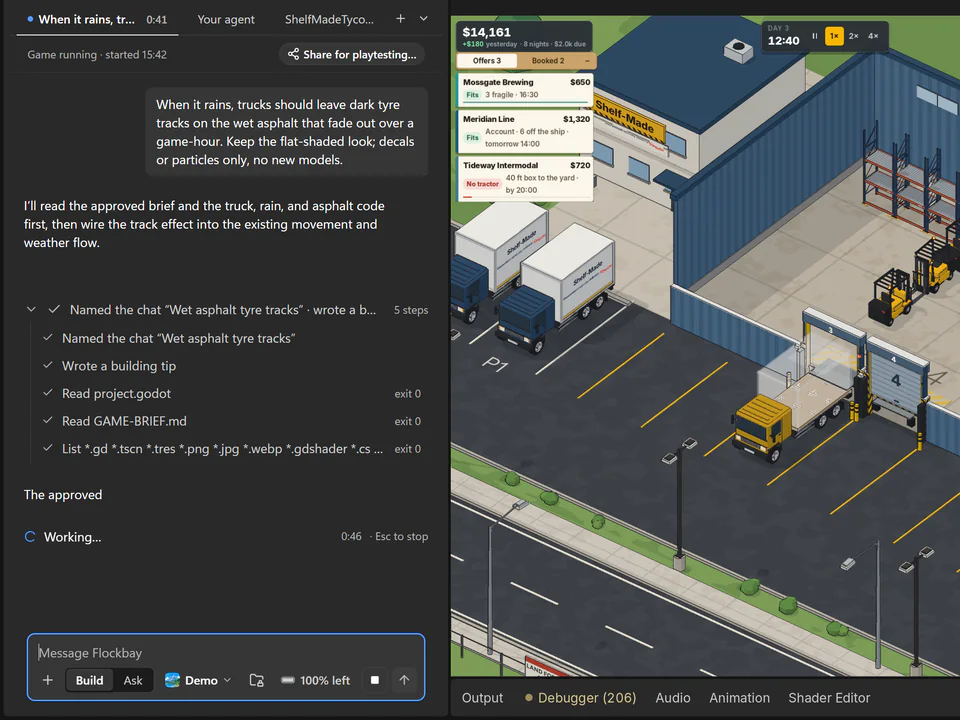
Shelf-Made Tycoon was made in Flockbay
Shelf-Made Tycoon is a cozy logistics tycoon: you grow a small warehouse until trucks, trains and container ships bring the work to you. Its team built it in Flockbay as a Godot 4 project, and it is on Steam for Windows, macOS and Linux.
Guides written from real runs
Each one shows what was asked, what Flockbay built, and what Godot printed along the way.
- Making a 2D platformer in Godot by describing itFour sentences about a fox platformer, and Flockbay built it in Godot 4: the brief, the scenes and scripts, the jump maths, and what it left unchecked.
- Godot printed 22,523 errors. One of them was the bug.Why “Nonexistent function in base”, “not found in base self” and “base object of type Nil” flood a Godot log, and the one parse error behind them.
- Publishing a Godot game on Steam: what Shelf-Made Tycoon shippedHow Shelf-Made Tycoon, a Godot 4 game, went on Steam: the export preset, a depot per platform, the demo, and capsule art cut from frames the game rendered.
Start with the game you have in mind
Download Flockbay, open it, and describe your game. No account or credit card is needed to start.